
The new Ensolva Nexus 6.0 version delivers what truly matters to users in their day-to-day work—greater speed, stability, and an even more intuitive system experience.
This upgrade is not focused solely on adding new functionalities. A significant part of the development was dedicated to optimizing existing processes, improving performance, and enhancing the user experience across the entire system. The result is a platform that responds faster, looks more consistent, and allows you to carry out key procurement activities without interruptions.
Behind this release is also a major technical step forward—a large number of reported bugs have been resolved, performance has been further optimized, and key screens and data display logic have been aligned. This means less frustration in daily work and greater trust in the system you use every day.
A faster and more stable system as the foundation of everyday work
Beyond the visible functional improvements, it’s important to highlight what’s happening “under the hood.” In this version, a large number of reported issues and user improvement suggestions have been addressed—235 tickets in total—along with numerous technical enhancements that ensure a more stable and reliable system performance.
All of this, combined with additional performance optimizations, means users can expect faster system response times and fewer interruptions—ultimately having a direct impact on productivity. We placed special focus on this area, accelerating many parts of the application, which will noticeably contribute to even greater user satisfaction.
Bill of quantities: a major step forward in Excel-based cost estimation
One of the most important features in this version relates to project bill of quantities and working with Excel.
Previously, preparing cost estimates often required additional editing and adjustments before importing them into the system. In version 6.0, this process has been significantly simplified.
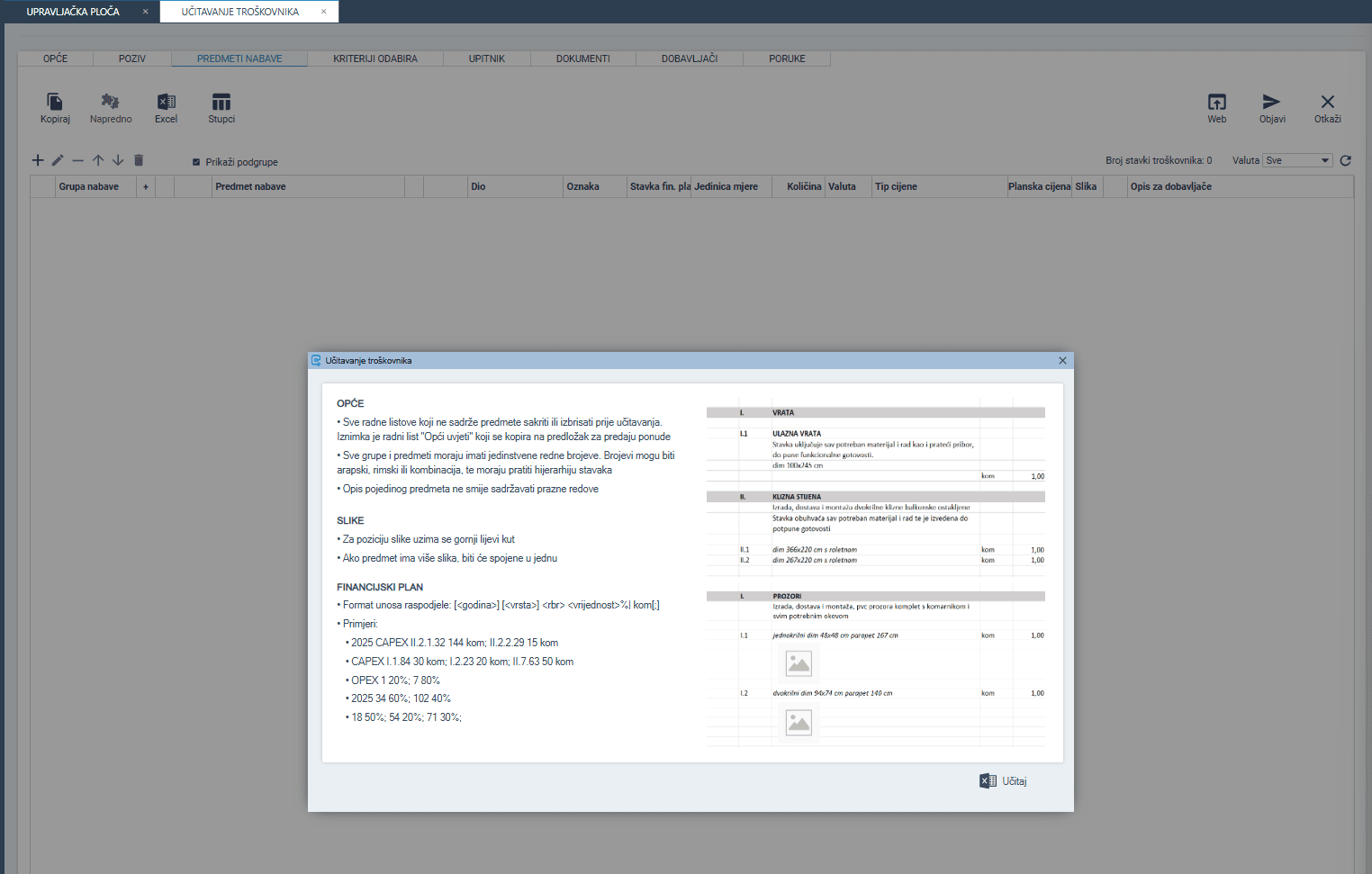
The system now automatically recognizes the structure of Excel files—headers, numbering, and key columns—and suggests mapping based on names and context. Users retain full control and can easily choose which columns to import and how to map them within the system.
If certain data does not exist in the system, Ensolva automatically creates it and recognizes the appropriate data type. After mapping, all data is automatically transferred into the RFX and ready for further processing.
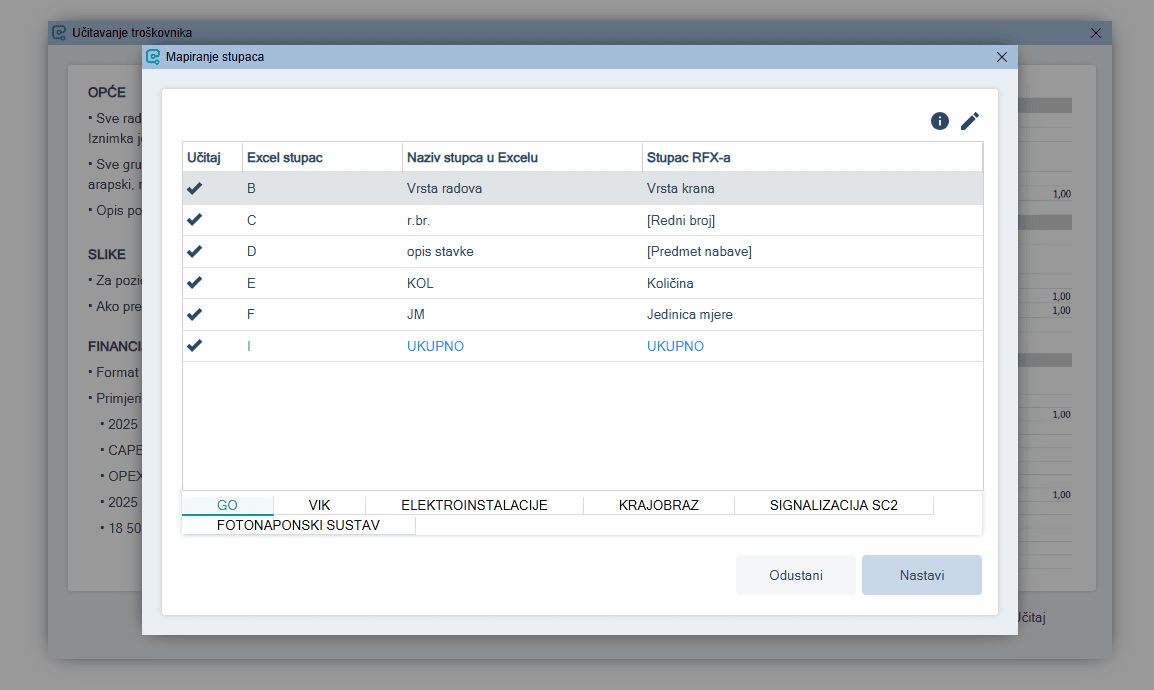
This functionality significantly reduces manual work, speeds up tender preparation, and minimizes the risk of errors—especially important for complex and extensive cost estimates.
More efficient and clearer procurement processes
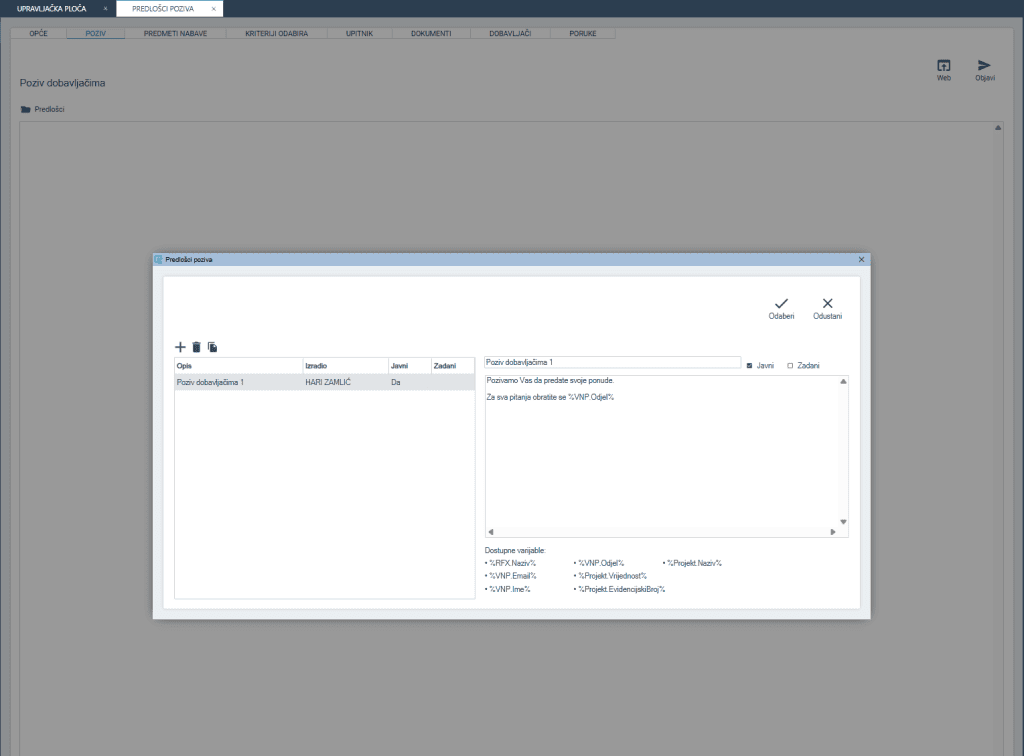
We have simplified and structured the RFX invitation process. A new feature allows the creation of invitation templates that can be customized and reused. This reduces the need to repeat the same steps and ensures consistency in communication.
The system now also enables one-click automatic notifications to suppliers who have not progressed to the next round or were not selected, eliminating the need for manual communication and reducing the risk of errors. Additionally, tracking of invitations sent to unregistered suppliers has been improved—it is now clearly visible which email address the invitation was sent to, further increasing transparency.
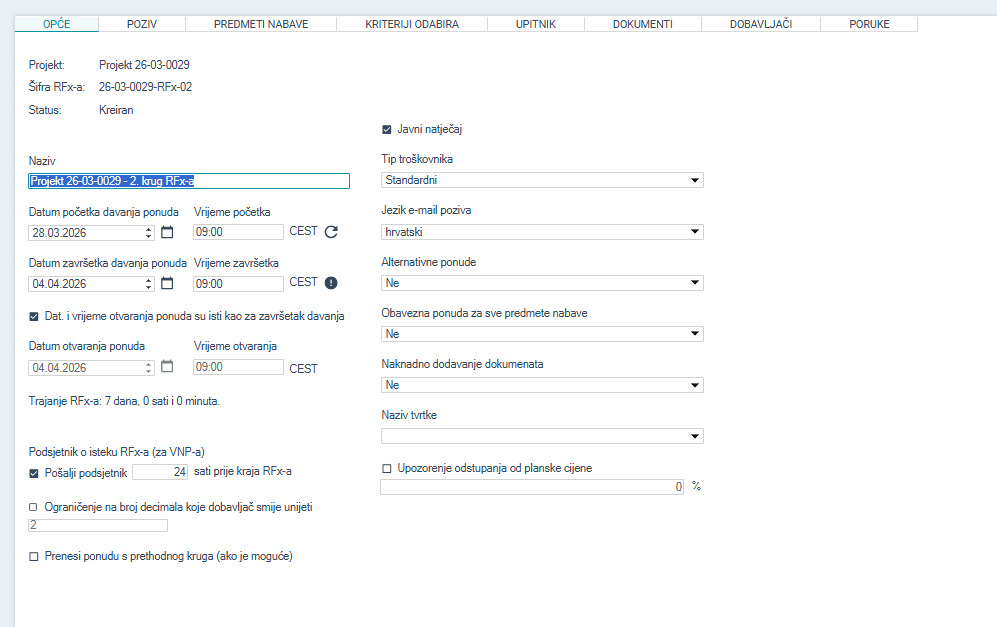
Another update is that the public tender indicator is now part of the RFX rather than the project, making tender creation easier for users.
An additional important feature that simplifies delegation is the transfer of permissions during substitution. A substitute user now temporarily receives the same permissions as the person they are replacing, allowing them to complete all necessary tasks. Once the substitution period ends, permissions automatically revert to their original state.
We have also introduced updates to purchase orders, adding two new functionalities that make daily work more flexible and better aligned with users’ real needs. It is now possible to define purchase order templates based on organizational units, enabling the use of different templates for different companies within a group.
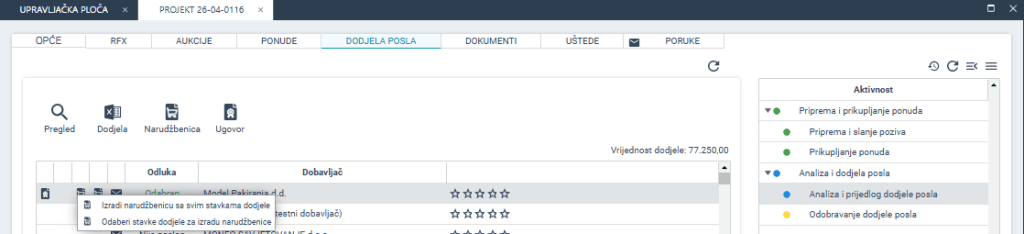
Additionally, users can now create multiple purchase orders for the same supplier within a single project. This is particularly useful in more complex projects where procurement takes place in multiple phases or across different budget frameworks.
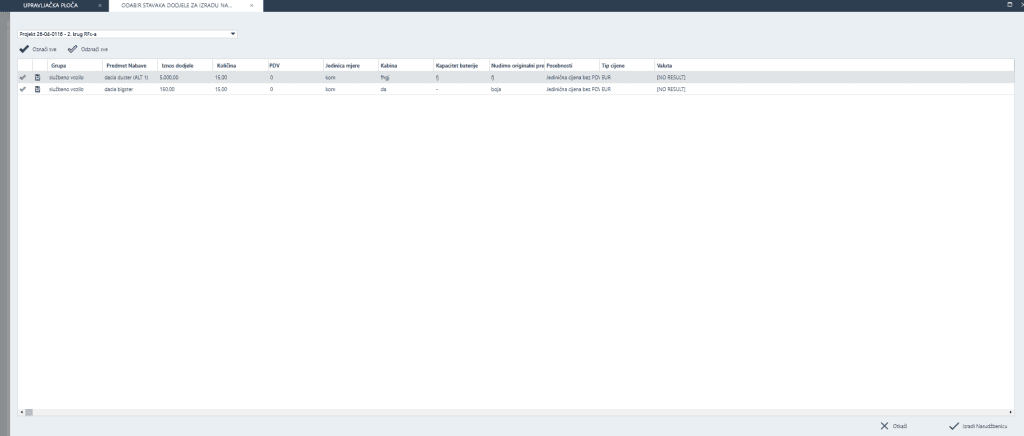
Finally, users can now select which allocation items will be included in the purchase order, providing an additional level of control and precision when creating documentation.
Better data visibility and control
One of the key improvements in version 6.0 relates to data visibility. Critical information is now organized more logically—for example, in the contract overview, the most important data appears first, speeding up contract searches.
Working with documentation has also been improved. The system now provides access to document version history, including information on who made changes and when within a project or RFX. Adding documents is easier thanks to the drag & drop functionality introduced on document management screens. The upload limit has been increased from 30 MB to 100 MB on both the Buyer and Supplier Portals, enabling work with larger files without additional limitations.
The new version also introduces important improvements in the Invoices module, making it easier to track and manage your data. Each invoice now clearly displays its source (eInvoice or manual entry), enabling faster verification. New fields—Budget Type and Project—have been added directly to the main overview and Excel export, allowing more precise planning and data linking. A new “Activity” column has been added to the invoice overview, along with a corresponding filter in the Filters tab. The column is also visible on printed invoices, allowing easy filtering and analysis of activities as needed.
In addition, when linking invoices, the system now automatically recognizes a purchase order or contract referenced in the description or notes, reducing the need for manual searching and speeding up the processing workflow.
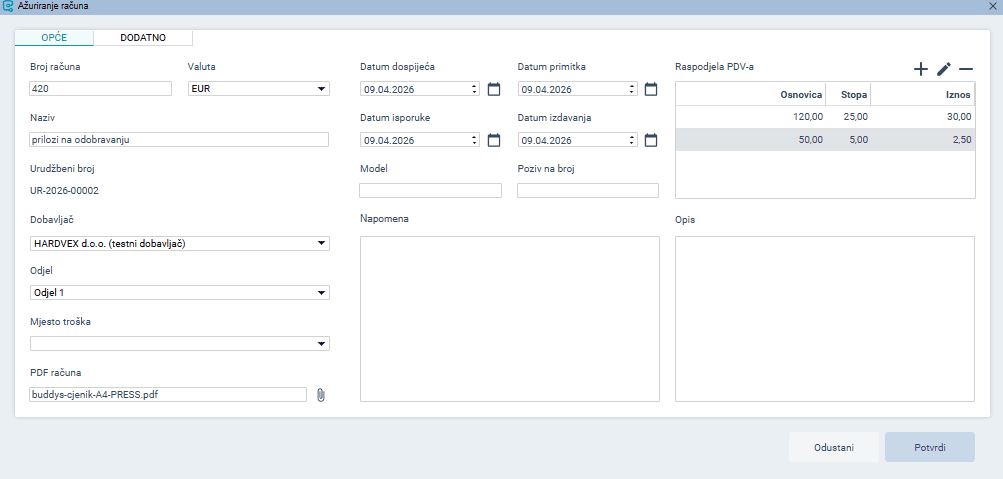
A major new feature is the introduction of the VAT allocation table. This functionality enables an accurate calculation of the total invoice amount, with data automatically retrieved from the e-Invoice. The allocation can be edited independently of the line items, while any changes made to the items are automatically reflected in the calculation.
In line with current regulatory requirements, support for Fiscalization 2.0 has also been introduced. When rejecting an e-Invoice, the system now requires the entry of a rejection reason, which is automatically forwarded to FINA and further to the Tax Administration, ensuring full transparency and compliance.
Consistent user experience across all portals
A strong emphasis has been placed on aligning the user experience. Screens have been visually and functionally standardized, and status indicator colors are now consistent throughout the system, making navigation easier. Filter logic has also been aligned across all main screens.
Changes are also visible in the Supplier Portal. Tender statuses are now clearer and more intuitive, reducing inquiries and misunderstandings (e.g., “Entered” is now “Not Started,” “Open Offers” is now “Completed,” etc.). Internal users benefit from improved visibility of activities, including timestamps for file and attachment uploads in the Internal Client Portal. Users of the Buyer Portal can now see the number of request-related messages directly on the dashboard for easier navigation. Additionally, overviews of purchase orders, contracts, and suppliers now include a view of related invoices. A search option by reference number has also been added to the project overview, making it easier for users who work with reference numbers.
All these improvements contribute to a smoother and more user-friendly experience—without the need for additional explanations or learning new workflows.
Conclusion
Ensolva 6.0 Nexus strikes a balance between innovation and optimization. On one hand, it introduces advanced features such as project bill of quantities, while on the other, it significantly enhances the functionalities users rely on every day.
Less waiting, less manual work, and fewer errors—allowing more focus on what truly matters in procurement: making high-quality decisions.