
We continuously develop Ensolva to make everyday work simpler and more efficient for our users. The new Ensolva 6.1 version introduces performance optimizations, more flexible content editing, and a range of functional improvements across supplier management, invoices, contracts, and projects.
One of the key highlights is the new SAQ module for automated supplier assessment, which enables centralized questionnaire management, automatic response scoring, and deadline tracking. In addition, the existing supplier evaluation functionality has been improved, while numerous refinements simplify everyday tasks.
Below is an overview of the most important new features introduced in Ensolva 6.1.
Faster Performance in Ensolva
Time is one of the most valuable resources for every procurement team. That is why, in version 6.1, we placed a strong focus on performance optimization and accelerating everyday tasks.
The new release brings:
Faster application startup
Significantly faster project copying
Additional performance optimizations for a smoother experience across the entire system
Although some improvements may seem small individually, their impact becomes noticeable in everyday work.
New SAQ Module for Automated Supplier Assessment
The new SAQ (Supplier Assessment Questionnaire) module in Ensolva enables the digitalization and centralized management of supplier assessment processes. Instead of manually tracking every step, users can access an overview of questionnaires, automate supplier inclusion in the assessment process, score responses automatically, and receive deadline-related notifications.
The module allows assessment rules, scoring criteria, and deadlines to be tailored to an organization’s needs, making it suitable for different supplier assessment processes.
Centralized Overview of All Questionnaires and Scores
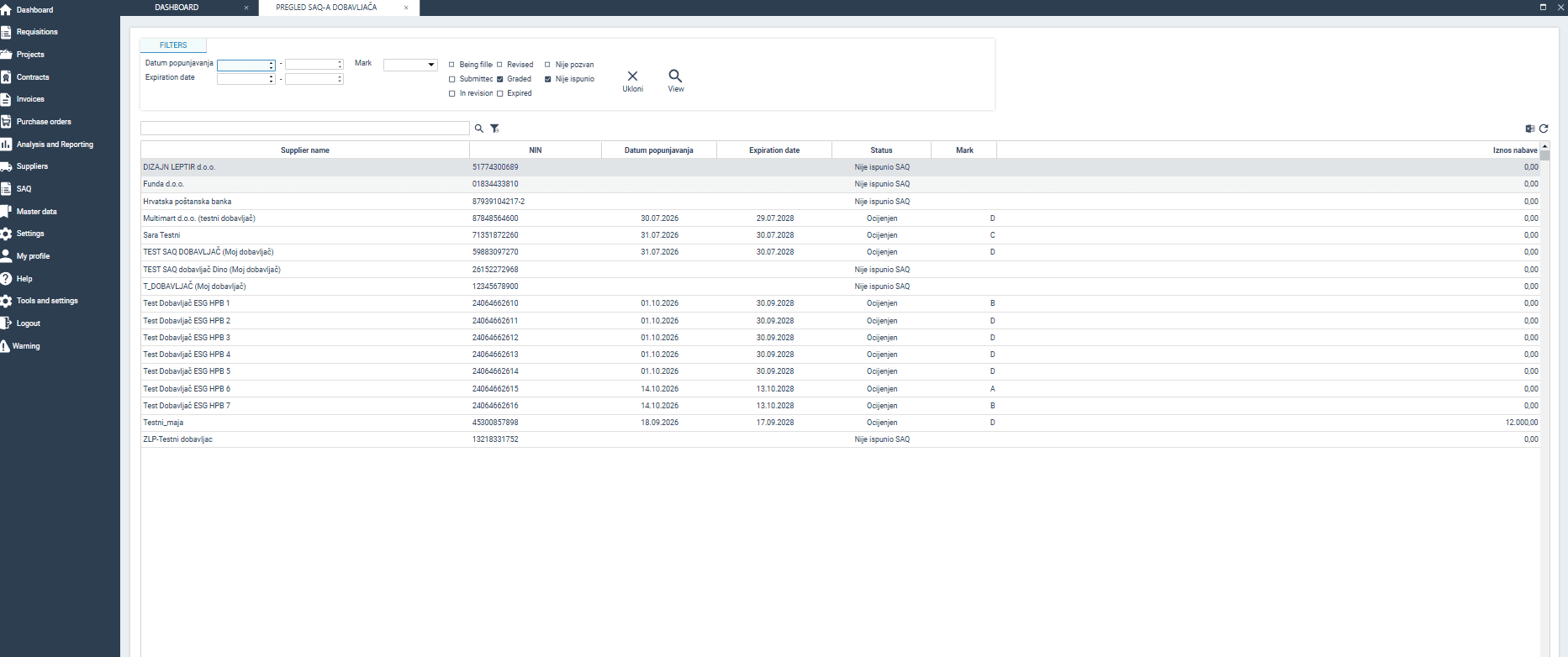
The SAQ module brings all relevant supplier assessment data together in one place. For each supplier, users can view the supplier’s name and Croatian tax identification number (OIB), questionnaire completion date, expiration date, assessment status, score, and procurement spend.
Status indicators make it easier to distinguish between suppliers who have not yet completed their questionnaires, those who have been assessed, and those whose questionnaires have expired. Available filters also help users identify suppliers and assessments that require additional attention.
Results can be exported to Excel, facilitating further analysis and report preparation. The module also provides access to previous questionnaire versions, which is useful when questions or assessment criteria change over time.
Automatic Supplier Inclusion Based on Procurement Spend
Jedna od važnih mogućnosti SAQ modula jest automatsko uključivanje dobavljača u proces procjene kada dosegnu unaprijed definirani prag nabave.
The threshold can be adjusted to suit your organization’s needs. The system can monitor annual procurement spend, including purchase order and contract values, and identify suppliers who meet the defined criteria.
This allows suppliers whose business volume reaches the specified threshold to be included in the assessment process automatically, without the need for continuous manual spend checks.
Suppliers can also be added manually when needed. This allows organizations to assess suppliers who may not meet a particular financial threshold but are important for other business reasons.
Completing Questionnaires Without Registering in Ensolva
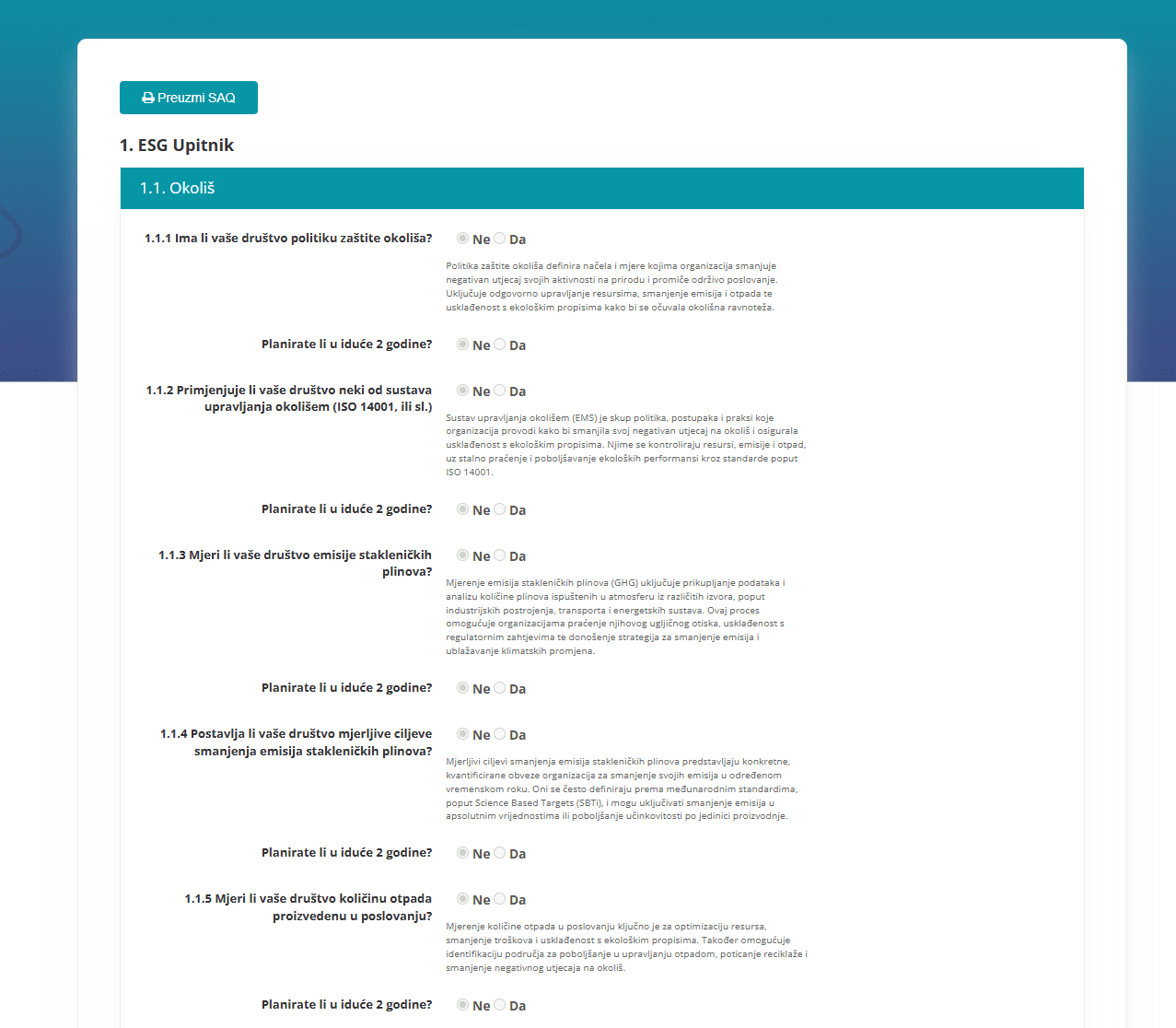
Once a supplier has been included in the process, they can proceed to complete the questionnaire. To make participation easier, SAQ questionnaires can be completed through a web form without registering for an Ensolva user account. The procurement team simply needs to add the supplier to the My Suppliers section of the system.
The supplier receives an email containing a link to the form and answers a predefined set of questions. The questions and available answers depend on the questionnaire type and the configured assessment rules.
For example, a questionnaire may include questions about environmental protection, environmental management systems, greenhouse gas emissions measurement, emissions reduction targets, or other areas relevant to supplier assessment.
Digital completion simplifies data collection and reduces the need to exchange separate documents and manually record responses.
Automatic Response Scoring Based on Defined Criteria
Manually reviewing responses and calculating scores can be time-consuming, particularly when assessing a large number of suppliers. The SAQ module therefore enables automatic response scoring based on predefined rules.
Points and weighting can be assigned to questions according to their importance in the assessment process. Based on these settings, the system calculates the final score, making it easier to compare results and reducing the need for manual calculations.
Scoring rules can be tailored to the type of questionnaire. Depending on the configuration, responses can be evaluated using different scoring scales, and individual questions can have a greater impact on the final result.
If a result meets the conditions for a negative assessment defined in the configuration, a notification can automatically be sent to a predefined email address. This helps responsible employees identify results requiring additional attention in a timely manner.
All these parameters are defined by the procurement team during implementation.
Automated Notifications and Deadline Tracking
Supplier assessment is not necessarily a one-time process. Data changes over time, making it important to monitor completion deadlines and the validity of previously submitted questionnaires.
The SAQ module enables automated email notifications to suppliers at different stages of the process
When a supplier is included in the SAQ process
Several days before the questionnaire completion deadline
On the questionnaire completion deadline
Several days before the completed questionnaire expires
On the questionnaire expiration date
Questionnaire completion deadlines and validity periods can be configured according to the organization’s needs. This allows organizations to define how much time suppliers have to submit their responses and how long a completed questionnaire remains valid before a new assessment is required.
Automated notifications reduce the need for manual reminders and make it easier to renew assessments on time.
Suppliers who fail to complete the SAQ questionnaire will automatically be prevented from participating in subsequent tenders.
What Does the SAQ Module Bring to Procurement Teams?
By combining these features into a single process, the SAQ module provides greater visibility and simplifies supplier assessment management.
Instead of manually tracking deadlines and calculating results separately, users can monitor questionnaire statuses, review scores, identify assessments requiring attention, and export data for further analysis—all in one place.
Automation does not replace the need to define assessment criteria. Instead, it helps ensure that established rules are applied more consistently throughout the process.
Interested in how the SAQ module could work in your organization? Contact us to arrange a presentation and discover how you can digitalize supplier assessments while tailoring assessment rules, scoring criteria, and deadlines to your needs.
New HTML Editor for More Professional Communication
Communication with suppliers is an important part of the procurement process. Clearly formatted information makes requirements and tender participation conditions easier to understand.
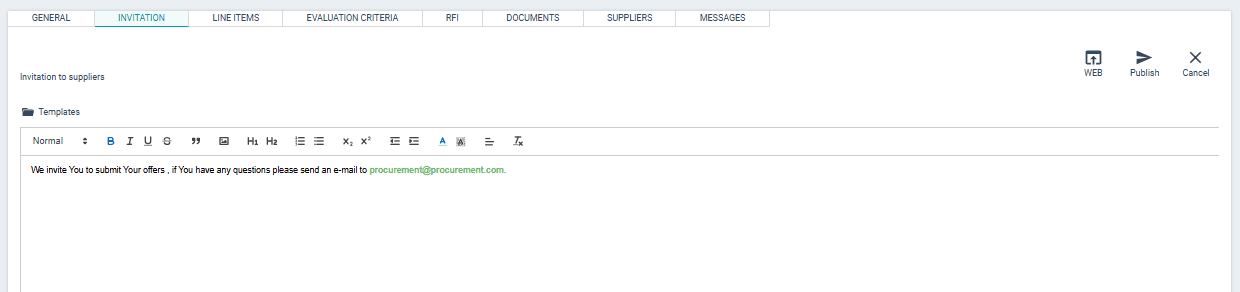
Version 6.1 introduces a new HTML editor for editing supplier invitations in RFx procedures. It allows users to format content directly within the text field.
Users can format text, highlight important information in bold, adjust font sizes and colors, and add images. This makes supplier invitations easier to navigate, with key information clearly highlighted to help suppliers understand what is required to participate in the process.
Improved Supplier Evaluation
In addition to the SAQ module, version 6.1 introduces improvements to the existing supplier evaluation functionality.
Users can now initiate evaluations for suppliers listed in the My Suppliers section, including suppliers who have been manually added to the system.
The process of opening an evaluation form has also been improved. The selected supplier is now automatically populated in the form, reducing the need to select the supplier manually again.
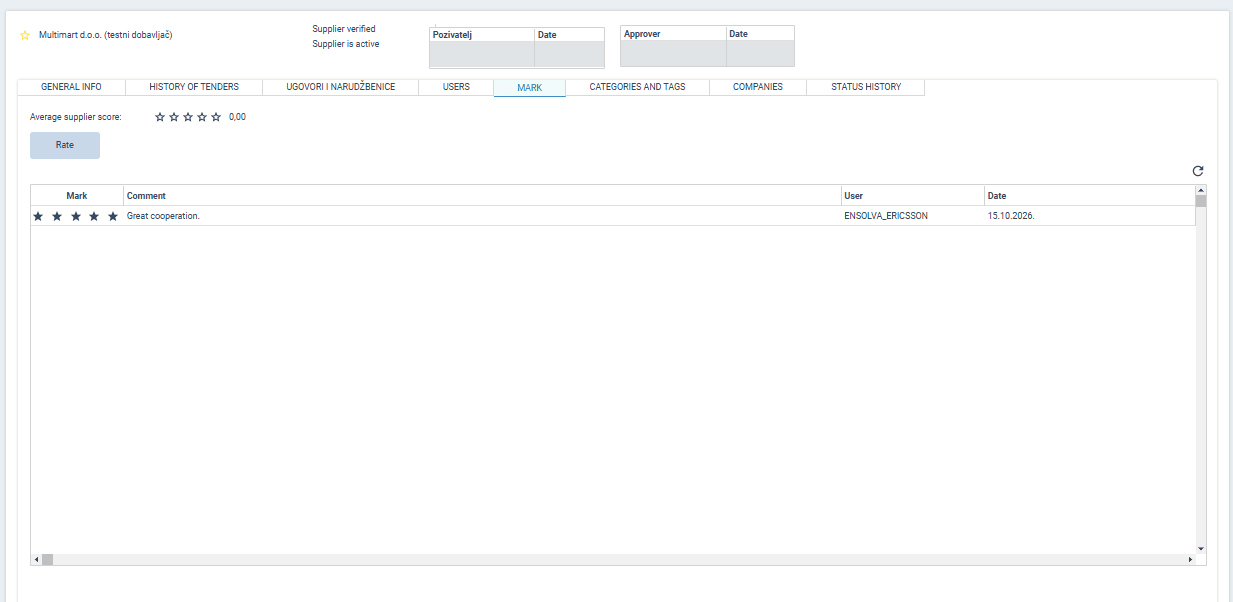
Standardized evaluation forms have also been provided to users who did not previously have them (hese forms can be customized upon request).
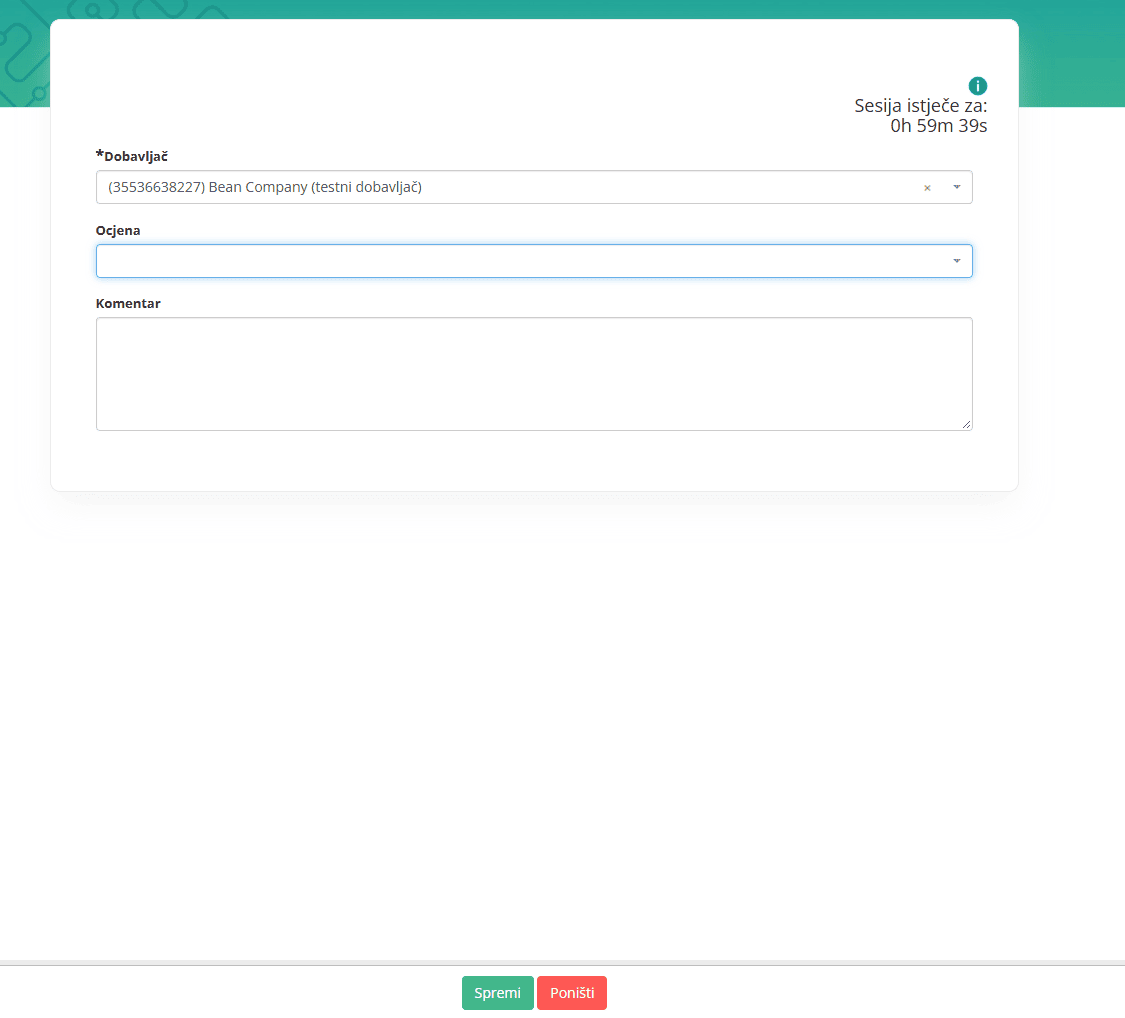
This functionality is currently available to users who have requests managed through workflows and possess the appropriate permissions. Expanding access to all other users is planned for a future Ensolva release.
Invoices Module – Easier Linking and Control
We have also introduced several practical improvements to the Invoices module, making it easier to find information and verify links between invoices and their supporting documentation.
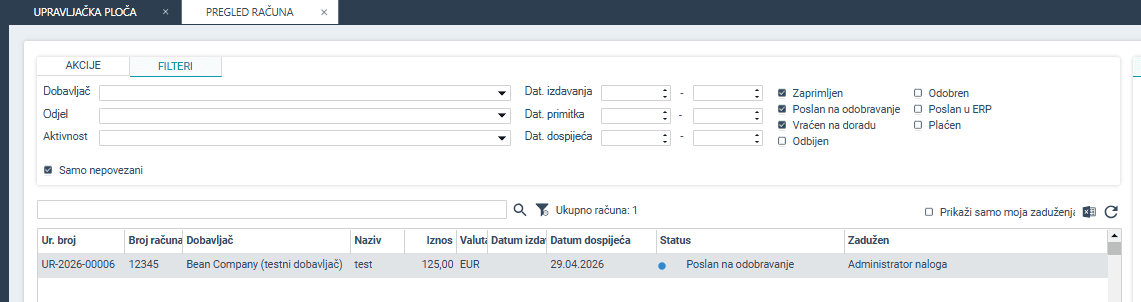
A new “Unlinked Only” option allows users to display invoices that are not linked to a purchase order or contract. This makes it easier to identify invoices that require review.
The supplier selection interface used when linking invoices has also been improved. The Croatian tax identification number (OIB) is now visible, making it easier to identify the correct supplier.
Invoice line-item columns have been aligned more closely with the e-invoice format, simplifying comparisons. In addition, invoice amounts excluding VAT are now displayed in the lists of linked invoices on contract, purchase order, and supplier screens, making comparisons and checks easier.
Together with an improved department filter and other minor refinements, these changes simplify everyday invoice processing and verification of links to procurement documentation.
Contracts – Clearer Management and Additional Fields
Accessing and editing contracts has been simplified in the Contracts module. The magnifying glass and pencil icons have been removed from individual contracts and replaced with an “Edit/View” button in the Actions menu. The available action depends on the user’s permissions: users with editing permissions will see Edit, while users with viewing-only permissions will see View.
The button for creating a purchase order from a contract has also been moved from the contract itself to the Actions menu. This makes the contract list clearer and organizes available actions more logically.

Two additional fields, “Class” and “Registry Number,” have been introduced for users working with public procurement documentation. These fields can be included in Excel exports of contract lists, used when printing contract forms, and searched through the general search function.
Projects – A Personalized Overview
Users can now right-click column headers to customize the columns displayed in the project overview or hide those they do not need for their everyday work.
The system remembers the selected settings, so the customized view remains in place when the screen is reopened. This allows users to tailor the project overview to their needs and focus more easily on the information that matters most to them.
A Few More Practical Improvements
In addition to the updates described above, Ensolva 6.1 includes several smaller refinements that further simplify everyday work.
More Precise Reminders for Parallel Approvals
For parallel approval workflows, the system now sends reminders only to users who have not yet completed their assigned action. This reduces unnecessary notifications for users who have already completed their part of the process.
Supplier Excel Template Available Throughout All RFx Stages
Users of the Buyer Portal can now download the supplier Excel template directly from the RFx web view at every stage of the RFx process through Download template button. This makes the template easier to access whenever users need it for record-keeping, email distribution, or use as a working spreadsheet.
A Clearer Supplier Portal
The name of the tab used to add attachments and additional information has been changed to a clearer label that better describes its purpose: Adding Attachments and Additional Information for the Buyer. This makes it easier for suppliers to navigate the portal and submit the required documentation compared with the previous label, Entering Additional Information and Adding Attachments for the Buyer.
Improved Overview of Internal Purchase Orders
Users of the Internal Client Portal can now view linked internal purchase orders for which a PDF document has been generated directly on the request form. This makes the documentation available alongside the request, without the need to search for it elsewhere.
Continuing to Develop Ensolva Around Our Users’ Needs
Ensolva 6.1 combines technical optimizations, functional improvements, and new supplier management capabilities. From faster performance and more flexible supplier invitations to automated supplier assessment through the SAQ module, our goal is to simplify the processes that make up everyday procurement work.
We believe it is essential that the system continues to evolve in response to real user needs. User suggestions, feedback, and experiences help us identify opportunities to eliminate unnecessary steps, improve visibility, and make everyday work even easier.
We will continue developing Ensolva to meet the needs of modern procurement, with further improvements and features already being prepared for future releases.